Back to products
ERP business management

Before committing to a sale, know what is still available.

Relate purchasing, sales and inventory so your team does not decide from different lists. See how each operation changes what you can offer and what you need to replenish.

KNOW WHAT YOU CAN SELL AND WHAT TO REORDER

Sample: See what you have to offer
Sample

Sales offers an item someone else has already committed. The warehouse has a different figure, and purchasing learns about the shortage while the customer is waiting.

ERP business management

Ideas for your business

For retailers and distributors whose sales, warehouse and purchasing teams need to agree on stock availability.

Choose a business example

There are 24 units of an item and a sale commits 3. Another person is about to offer that same product.

Review the sale and reserved units to recognize the 21 that remain available.

A clear reference for the next offer, without counting committed units as available.

Your inquiry · 01

Several orders consume an item, and purchasing needs to know what is missing before ordering more.

Review stock movements alongside the purchases and sales that explain them.

Prepare replenishment with a clearer view of what has sold and what you can still offer.

Sample

A sale of 3 units changes the next decision.

The example starts with 24 units and shows why 21 remain available after reserving a sale. These are fictional quantities.

Your inquiry

Sell with a clear view of what remains for the next customer

Review the sale and reserved units to recognize the 21 that remain available. A clear reference for the next offer, without counting committed units as available.

Sample · 01

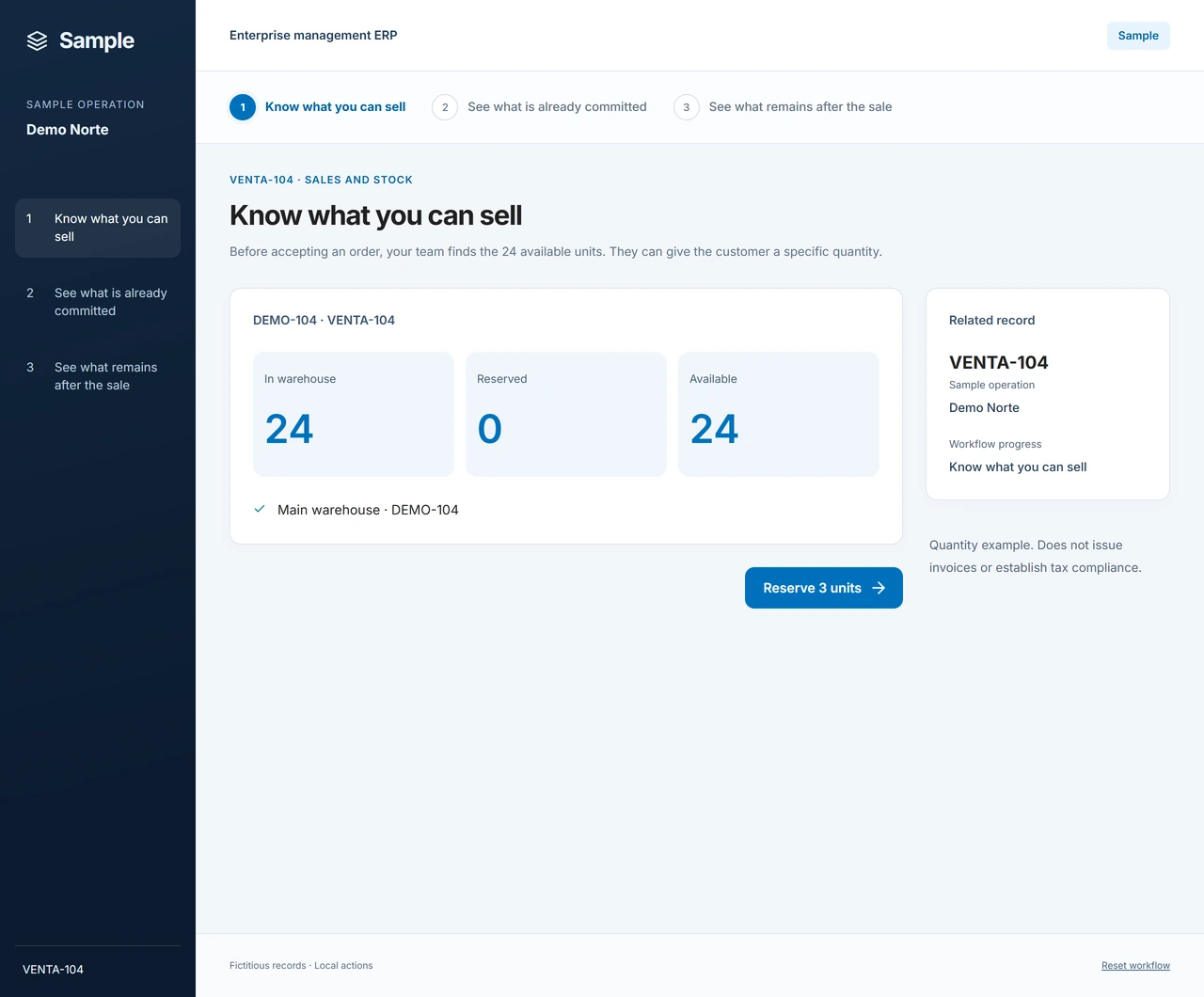
See what you have to offer

The item has 24 available units before the sample sale.

Sample: See what you have to offer. The item has 24 available units before the sample sale.
Example with fictional data. Images show the main walkthrough; your proposal details the included features.
Sample · 02

Account for what you have already sold

The sale reserves 3 units so the team can recognize the commitment.

Sample: Account for what you have already sold. The sale reserves 3 units so the team can recognize the commitment.
Example with fictional data. Images show the main walkthrough; your proposal details the included features.
Sample · 03

Prepare the next sale with the right balance

There are 21 left available. The operation explains why the quantity changed.

Sample: Prepare the next sale with the right balance. There are 21 left available. The operation explains why the quantity changed.
Example with fictional data. Images show the main walkthrough; your proposal details the included features.
ERP business management

Where it fits

An existing product. Any customization your business needs is assessed and quoted separately when contracting.

  • Review availability before committing to another sale.

  • Relate stock to purchasing and sales to prepare replenishment decisions.

What to define

  • Companies, warehouses, users, modules and initial data are specified in the offer.

  • Tax invoicing, accounting, payroll and integrations are not implied by this inventory sample.

Prepare the next step

  1. Tell us when differences appear between what sales offers and what the warehouse finds.

  2. Identify companies, warehouses and people who need to check availability.

  3. Let us review the initial data and scope needed to work from a shared reference.

ERP business management

Plans and pricing

Reference prices in USD. Setup includes the first month; monthly billing starts in the second. Customization and installation on your servers are quoted separately by contract, without equipment or servers. Final scope and taxes are detailed in your quote.

Starter

Connect purchases, sales and inventory for a small team.

From

USD99/ month

1 company

Initial payment

From

USD249/ one-time payment

1 setup

Included

  • Connected purchasing, sales and inventory movements.

  • Product features for your team, with no artificial intelligence included.

  • Reference scope: up to 3 users.

  • Setup includes the first month of service. Monthly billing starts in the second month.

Offer terms

Limits

  • Included quantity is the basis for the quote. Confirm transaction volume, storage, support hours and operating conditions before contracting.

Additional costs

  • Optional customization, quoted during contracting.

  • Additional capacity, migration and integrations are quoted according to your needs.

  • Installation on your servers (on-premises) is available at additional charges negotiated in the contract. Every installation is agreed by contract; equipment and servers are not included.

Not included

  • Customization is not automatically included.

  • Customization, migration and additional integrations are not part of the monthly fee. Setup covers configuration and onboarding for the agreed scope, together with the first month.

  • This plan does not include AI, bots or MCP tools for agents.

  • Equipment and servers are not included. On-premises installation is quoted separately, with scope and responsibilities defined by contract.

Taxes: Taxes and payment terms are detailed in the quote.

Ask about this option

Team

Coordinate daily work across more users.

From

USD159/ month

1 company

Initial payment

From

USD490/ one-time payment

1 setup

Included

  • Connected purchasing, sales and inventory movements.

  • MCP tools let your connected agents access and use authorized system functions.

  • Reference scope: up to 5 users.

  • Setup includes the first month of service. Monthly billing starts in the second month.

Offer terms

Limits

  • Included quantity is the basis for the quote. Confirm transaction volume, storage, support hours and operating conditions before contracting.

  • MCP tools connect your agents; this plan does not include built-in AI bots or AI provider usage.

Additional costs

  • Optional customization, quoted during contracting.

  • Additional capacity, migration and integrations are quoted according to your needs.

  • The connected agent or AI provider service and its usage are contracted and paid for separately.

  • Installation on your servers (on-premises) is available at additional charges negotiated in the contract. Every installation is agreed by contract; equipment and servers are not included.

Not included

  • Customization is not automatically included.

  • Customization, migration and additional integrations are not part of the monthly fee. Setup covers configuration and onboarding for the agreed scope, together with the first month.

  • Equipment and servers are not included. On-premises installation is quoted separately, with scope and responsibilities defined by contract.

Taxes: Taxes and payment terms are detailed in the quote.

Selected option

Business

Support a larger team in the same business operation.

From

USD249/ month

1 company

Initial payment

From

USD790/ one-time payment

1 setup

Included

  • Connected purchasing, sales and inventory movements.

  • MCP tools let your connected agents access and use authorized system functions.

  • Reference scope: up to 10 users.

  • Setup includes the first month of service. Monthly billing starts in the second month.

  • AI bots included with 1,000,000 tokens per month shared by the account; overages charged separately.

Offer terms

Limits

  • Included quantity is the basis for the quote. Confirm transaction volume, storage, support hours and operating conditions before contracting.

  • AI allowance is shared by the account each month, not per user or bot. Provider-reported input and output tokens are added together, including processed context. The model, usage cycle and overage rate are agreed by contract; tokens do not represent a fixed number of messages.

Additional costs

  • Optional customization, quoted during contracting.

  • Additional capacity, migration and integrations are quoted according to your needs.

  • Additional tokens are billed separately at the model-specific rate agreed in the contract.

  • Installation on your servers (on-premises) is available at additional charges negotiated in the contract. Every installation is agreed by contract; equipment and servers are not included.

Not included

  • Customization is not automatically included.

  • Customization, migration and additional integrations are not part of the monthly fee. Setup covers configuration and onboarding for the agreed scope, together with the first month.

  • Unlimited AI usage and Meta/WhatsApp or other external channel messaging fees are not included.

  • Equipment and servers are not included. On-premises installation is quoted separately, with scope and responsibilities defined by contract.

Taxes: Taxes and payment terms are detailed in the quote.

Ask about this option

Customization is quoted separately during contracting. Installation on your servers (on-premises) is available at additional charges negotiated in the contract. Every installation is agreed by contract; equipment and servers are not included.

Ask without selecting an option
ERP business management

Before you decide

Where does a difference arise between what your team offers and what is actually available?

How do Starter, Team and Business differ in AI capabilities?

Starter does not include AI. Team includes MCP tools to connect agents that access information or perform authorized actions; it does not include built-in bots, and AI provider usage is paid separately. Business includes AI bots with the monthly token allowance published in its plan. Tokens measure AI usage; additional tokens are billed separately at the rate agreed when contracting.

Does setup include the first monthly payment?

Yes. The setup payment includes the first month of your contracted plan; monthly billing starts in the second month. Customization and additional charges are detailed separately in the proposal.

Can you install it on my company's infrastructure?

Yes. On-premises installation is available for additional charges negotiated in the contract. Equipment and servers are not included. The scope, requirements and terms of every installation are agreed by contract before work begins.

How does it help me know what I can offer?

The sample relates a sale to the units it commits and the available balance. We review how you buy, sell and move items to define the appropriate product scope.

Can I organize several warehouses?

Tell us how many you use and how goods move between them. The offer defines the capabilities, limits and customization needed for your operation.

Does it also cover Venezuelan tax invoicing?

Tax scope must be expressly confirmed. Showing sales and inventory does not establish invoicing, official approval or tax compliance.

ERP business management

Let's discuss your business

Where does a difference arise between what your team offers and what is actually available?

Your inquiry

ERP business management · Sell with a clear view of what remains for the next customer · Team

You can also email us and name the product you are interested in. [email protected]

Do not include passwords, private keys or sensitive personal, clinical or financial data.

Optional. Enter your number without the country calling code.

Min. 30 · 0/5000 characters
MICROTEC2017 uses your form details to handle your inquiry and limited technical data (IP address, browser and origin) to prevent abuse. We retain inquiries and delivery records for 12 months, and technical data for 30 days. To ask about your data or request deletion, email [email protected] · Privacy